Honeycomb: The World Beyond Hoverboard Guide: Unlock, Controls & Durability
The hoverboard in Honeycomb: The World Beyond — how to unlock it, how it handles on Sota7, and how its durability scales with difficulty.
FAQ
Is there a hoverboard in Honeycomb: The World Beyond?
Does the hoverboard break in Honeycomb: The World Beyond?
How do you unlock the hoverboard?
How do you repair the hoverboard?
Why does the hoverboard keep throwing me off?
Is the hoverboard the same as fast travel?
What is the hoverboard in Honeycomb: The World Beyond?
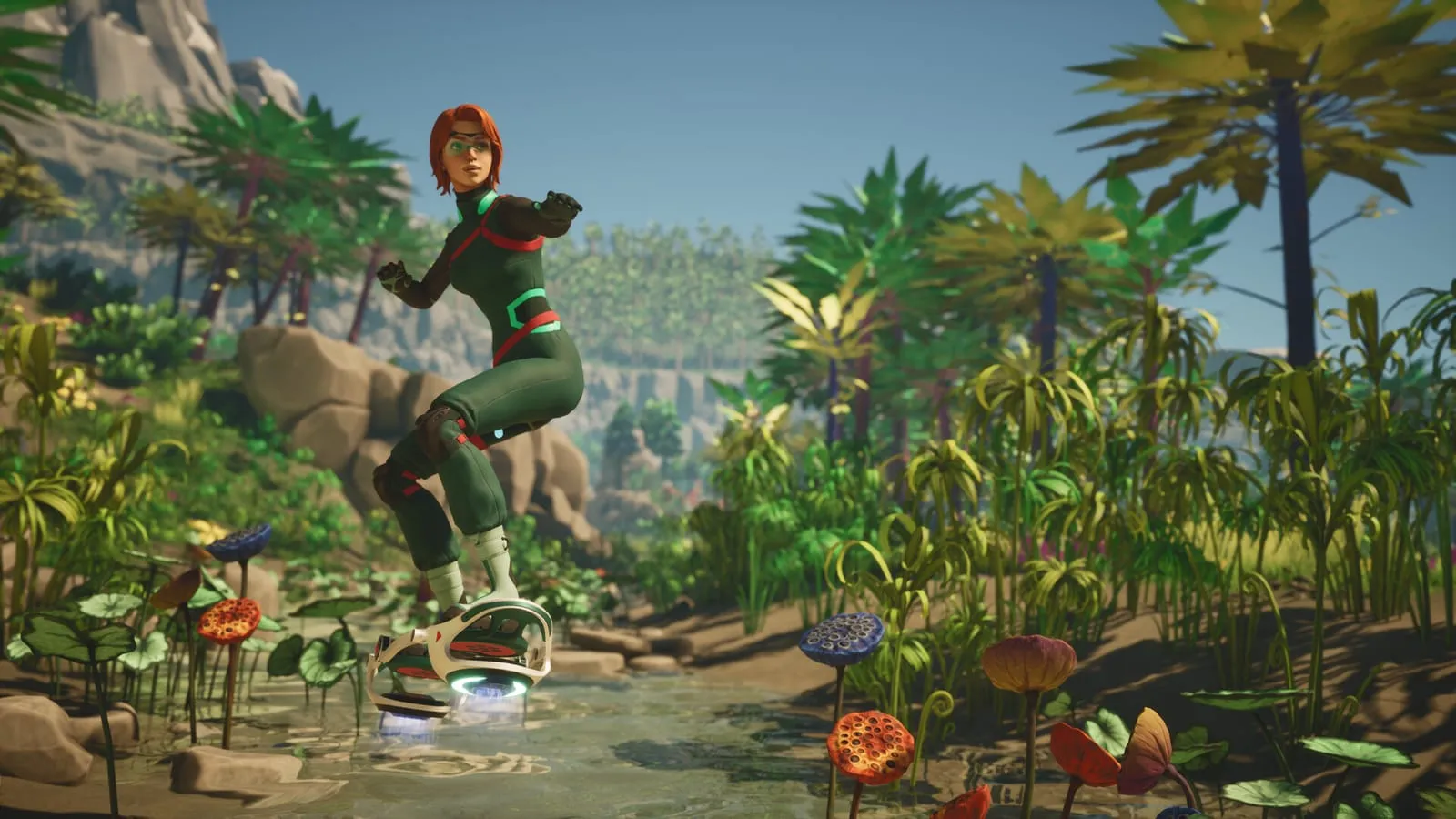
The hoverboard is the game’s officially documented personal vehicle — a rideable platform that carries you across Sota7’s terrain. The official site bills it plainly: “Make exploration easier with a hoverboard to move quickly across the map.” The pre-release screenshots show it in action: an explorer in a green suit gliding over a shallow stream through lush vegetation, shown in third person, heading toward open ground — and the developer has said vehicles are where the first-person game shows “some moments of 3rd person”. Together with the community-documented hover buggy, it is one of the two known ways to travel faster than on foot — see the Sota7 zones guide for how the three regions shape travel.
How do you unlock and deploy the hoverboard?
You craft it. Community reports describe the board as a deployable: craft it once, then enable it from your equipment whenever you need it — no quest gates it, and no shop sells it. The Steam achievement Hop on (“And float away”) is attached to the board; it was already held by 45.2% of players two days after launch and reads as the crafting step in the community wiki’s interpretation — see the achievements census for the full ladder. What no source publishes is the crafting recipe itself: its ingredients and tech tier are undocumented.
How does hoverboard durability work?
Since Hotfix #4 (September 14, 2026), the hoverboard sits on the single difficulty-scaled wear list — the same setting that covers your tools, worn gear, drone and food:
| Difficulty | Hoverboard wear rate |
|---|---|
| Scientist | 1.0 |
| Survivalist | 1.25 |
| Space Hell | 2.0 |
| Engineer | Slider, up to 2.0 |
Practically: on Space Hell the board wears twice as fast as on Scientist, and fainting costs 5/10/15% durability by difficulty on top. The full wear-system breakdown is in the tools and gadgets guide and the storage and rotting guide; the mode differences are tabulated in the game modes guide.
Repair logistics are simple: player testing found that a single fine maintenance kit restores the board from zero durability — the community advice is to keep a stack of them on long expeditions, with regular maintenance kits reserved for passive tools (community wiki, citing player Alidove).
Why does the hoverboard throw you off?
Launch-week player reports are blunt about the handling: “even with the tiniest of bumps you get knocked off. hell, going over a rock will knock you off sometimes” — one reviewer called a rocky stretch “a miserable experience” even while ranking the board the best option for long distances. The developer’s position, as relayed in the same reports, is that the board is intended for flat terrain; no handling upgrade has been announced. The community’s workaround list:
- Ride paths, roads and shallow creeks rather than open rocky ground
- Dismount before rocky slopes and walk the hard stretches
- Budget for the wear: on Space Hell everything wears at twice the Scientist rate (see the table above)
Beyond handling, one caveat from the same channel: tricks and hoverboard races were discussed in a Gamescom 2026 interview — ramps, hoops, time trials — but explicitly not promised.
Where does the hoverboard fit among Sota7 transport?
The documented picture, with source tiers:
- Hoverboard — official: shown in pre-release screenshots, named in the Hotfix #4 wear-list, and billed on the official site as the way to “move quickly across the map”; crafting-based deployable per community reports
- Hover buggy — community-documented only, crafted after building the garage module at your base (its crafting achievement sat at 4.9% in this wiki’s launch census); mentioned in the zones guide as the other terrain vehicle
- Fast travel — a separate system: Hotfix #3 notes that the in-game Fast Travel guide “moved to the World category and was fixed”, but the network’s rules are undocumented — no wiki page can track what no source says yet
All three are terrain or network transport — none of them is the other, and the wear rules above apply only to the vehicles you own.
What is not confirmed yet?
The record now covers existence, crafting-based unlock, repair, handling and wear. These lines are open items, listed for verification as sources land:
- Crafting recipe — no source publishes the ingredients or tech tier
- Controls and handling details — no official input scheme exists beyond the community tips above
- Speed — no figure has been published
- Tricks and races — discussed in a Gamescom 2026 interview, explicitly not promised
If you can confirm any of these from play, they belong in this guide — the wiki’s convention is to name the source tier (official / developer / community) for every fact, as the tools guide does. Everything above was last checked on September 18, 2026 against the patch notes tracker.
More from this wiki
Related Articles
More from the field survey
guides
Honeycomb: The World Beyond Composter Guide: Biomass from Plant Matter
The Composter in Honeycomb: The World Beyond — how the Second Life quest's biomass loop works, what to feed it, and what the biomass is for.
guides
Honeycomb: The World Beyond Storage & Rotting Guide: Containers & Fridges
How food rotting works in Honeycomb: The World Beyond — containers slow decay to 15%, powered fridges stop it entirely, and difficulty scales spoilage.
guides
Honeycomb: The World Beyond Space Hell Difficulty Guide: Survival Tips
Space Hell is Honeycomb: The World Beyond's hardest difficulty — scaled wear rates, the 15% fainting penalty, and how to keep your gear and food alive on Sota7.
Was this helpful?
Thanks for the feedback!